I’ll be honest: for a long time I skipped anything with “VPC” or “networking” in the title. It looked like the deep end of the pool, full of acronyms and diagrams with too many arrows. I told myself I’d get to it later.
“Later” finally arrived, and it turns out the picture is friendlier than the vocabulary makes it sound. Here’s how each piece landed for me.
VPC — your own fenced-off plot
A VPC (Virtual Private Cloud) is your own private section of AWS. Think of it as a plot of land you’ve fenced off inside a much bigger city. Nothing else gets in unless you build a way in. Everything else here lives inside this fence.
Subnets — dividing the plot
A subnet is just a smaller area within your plot. The important split is:
- A public subnet has a road to the open internet.
- A private subnet has no direct road. It’s tucked away in the back.
That distinction does more work than anything else in networking. You put the things that should be reachable, like a web server, in a public subnet, and the things that shouldn’t, like your database, in a private one.
Internet Gateway — the front gate
The road to the internet doesn’t exist until you build the gate. An Internet Gateway is that gate between your VPC and the wider internet. No gateway, no public access. It’s the single, deliberate door in the fence.
Route tables — the signposts
Route tables are the signposts that decide where traffic goes. “Headed to the internet? Go through the gateway. Staying inside? Take this turn.” A subnet is “public” precisely because its route table points at the internet gateway. That was a small revelation: public vs private isn’t a setting, it’s a consequence of where the signposts point.
NAT Gateway — a one-way door
Here’s the clever bit. Your private database might still need to reach out (to download an update, say) without letting anyone reach in. A NAT Gateway is that one-way door: things inside can start a conversation with the outside, but the outside can’t start one with them.
Security Groups — the guard at each door
Finally, a security group is like a guard standing at each resource’s door with a guest list. By default nobody’s on it. You add rules for exactly who’s allowed in (this port, from that source). Everything not on the list is turned away.
The picture that replaced the fog
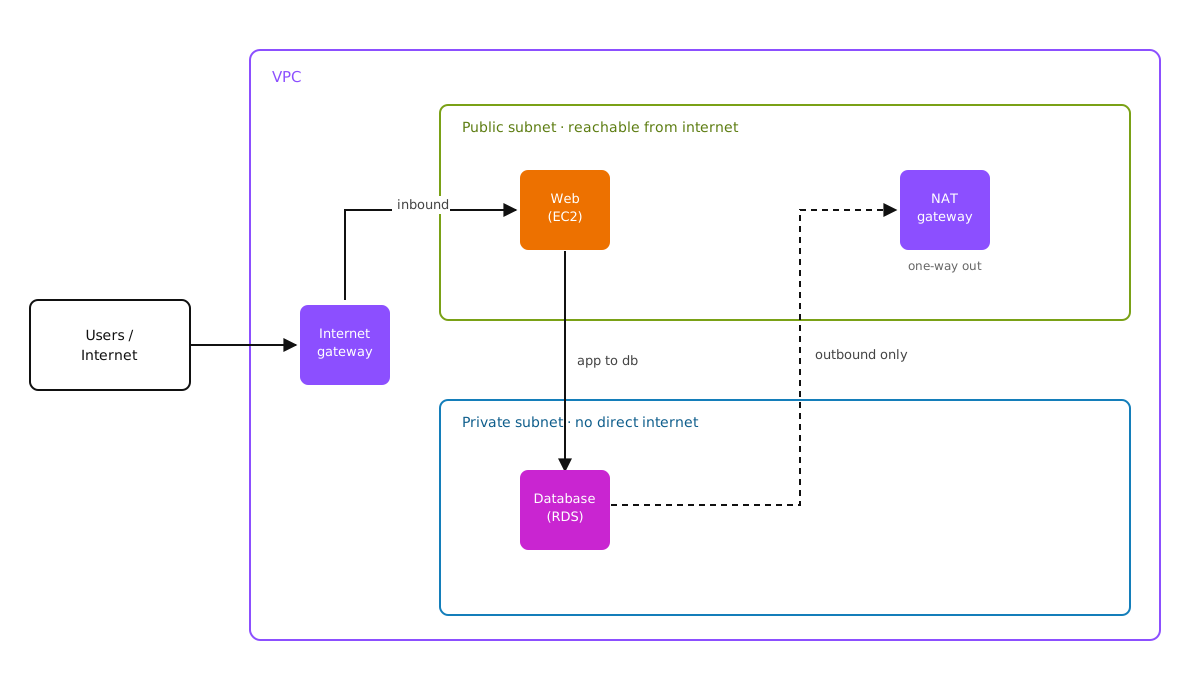
Quick reference, for future me
| Term | What it is | Plain version |
|---|---|---|
| VPC | Your isolated network in AWS | A fenced-off plot of land |
| Subnet | A division of the VPC | An area within the plot |
| Public subnet | Subnet with a route to the internet | Has a road out front |
| Private subnet | Subnet with no direct internet route | Tucked away in the back |
| Internet Gateway | VPC’s connection to the internet | The front gate |
| Route table | Rules for where traffic goes | The signposts |
| NAT Gateway | Outbound-only internet for private resources | A one-way door |
| Security Group | Per-resource firewall | A guard with a guest list |
I’m not pretending I’ve mastered this. The finer points, the difference between security groups and network ACLs, the address-range math, are still fuzzy for me. But the shape of it finally makes sense, and the wall of arrows that used to scare me off now reads like a map. For the corner of AWS I avoided longest, that feels like a real win.